
A video for every feature you ship
SaaS founders post their releases on X and LinkedIn, most often as a plain screenshot. A video stops the scroll better, but it takes editing skills, and doing it again for every release.
Teaso starts from the product’s address. It makes a first presentation video, then one video per shipped feature, from a sentence and a screenshot: that second use is what brings users back, which is why each brand and its brand kit are saved from the very first video.
The format follows from how these videos are watched:
- in the feed, on a phone, with the sound off: no voice-over, and the hook lands within the first two seconds;
- with the real product: motion design built on templates, animated text and the site’s own screenshots, never an AI-generated video;
- short: 18 seconds, one idea per shot, very few words, set very large.
From URL to MP4
The long steps (reading the site, calling Claude, starting a render) go through a job queue in PostgreSQL (pg-boss), handled by a separate worker. Meanwhile, the loading screen shows what has already been found: the logo, the colours, the screenshots.
The split that matters most is between preview and render. The preview is the real video composition, played in the browser with Remotion’s Player: it is free, instant, and updates as you type. The server render costs money: it only starts on download, requires an account and uses a credit. So everything can be tried for free, and nothing costly runs without the user asking for it.
Reading a brand from pixels
For a video to look like the product, it needs the product’s colours, font and logo. The CSS declares them, but does not always say what shows: a title declared green can be painted grey by an effect on the site, a button can be a gradient, a background can be an image.
So the site is loaded in Chromium, at a desktop (1440 × 900) and a phone (390 × 844) viewport, at double resolution, after hiding cookie banners and chat bubbles. I first collect candidates from the page: the title’s colour from its first words, the buttons’ gradients, how much of the first screen each colour covers. Then every candidate is checked against the screenshot.
To read the colours of an area, its pixels are grouped by 32 levels per channel, then each group is merged with its close neighbours (what a gradient or text anti-aliasing produces) into one average colour. A painted colour close enough to the CSS one takes the exact CSS value, which JPEG compression and anti-aliasing shift slightly. The logo is captured on its own, on a transparent background: its single vivid colour counts, even when small, like the blue dot in Teaso’s logo.
A correct colour is not enough, it must also stay readable. Every text colour in the video goes through a function that guarantees a contrast of at least 4.5:1 with its background. A brand colour is used as a fill if it stands out from the background by luminance or by hue: the light green accent of a white site (1.5:1) stays the brand, instead of falling back to black.
I also tried to predict whether a vivid colour can fill the whole frame without looking garish. Across twelve measured sites, neither the colour’s vividness nor the room its site gives it told the answer. So it stayed the user’s choice in the Brand kit, never an automatic decision.
Copy written by Claude, held by a schema
The storyboard is an internal JSON: the template, the brand kit, and a list of typed scenes (hook, punch words, answer, demo, steps, call to action). Claude only writes the copy, as structured output, from the page’s content; the app adds the brand kit, the screenshots and the address.
Every text has a limit, in characters and in words for headlines, set by the template from its layout and reading time. The API does not enforce them: a Zod schema checks them afterwards. A text that runs too long is sent back to Claude with the reason, twice at most; after that, optional texts that are still invalid are dropped. The database therefore only ever holds a valid storyboard, one the video knows how to show.
The default model is Claude Haiku, never Opus: the cost of each video depends on it, and I track it per generation in the admin.
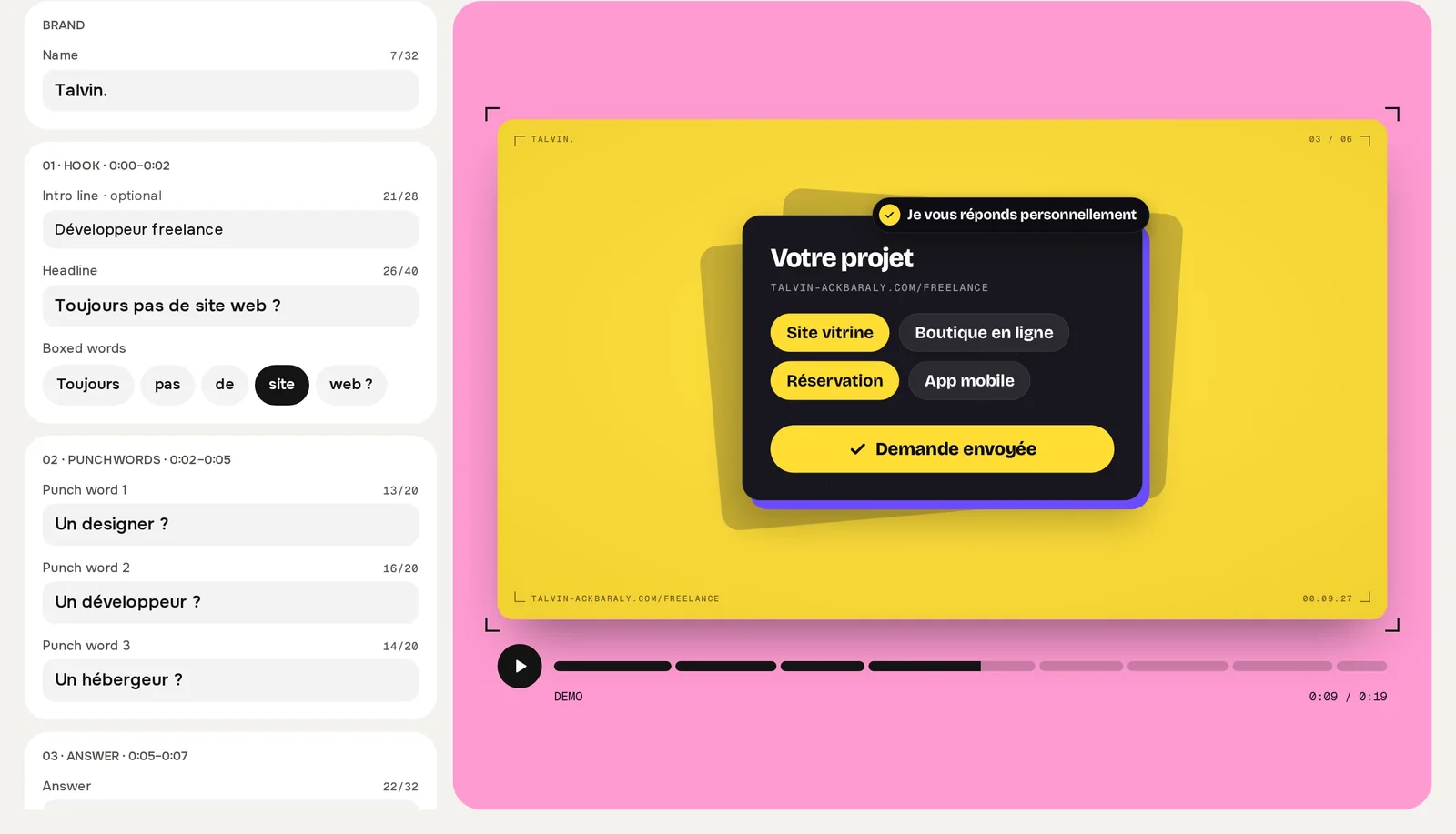
Nothing is required before seeing the video. The user then fixes each scene in its card, picks the highlighted words or asks for another hook, which Claude rewrites from another angle with the same screenshots. Edits save on every pause in typing, and the server rejects a storyboard whose locked parts (the sequence, the brand kit) have changed.
One storyboard, four formats
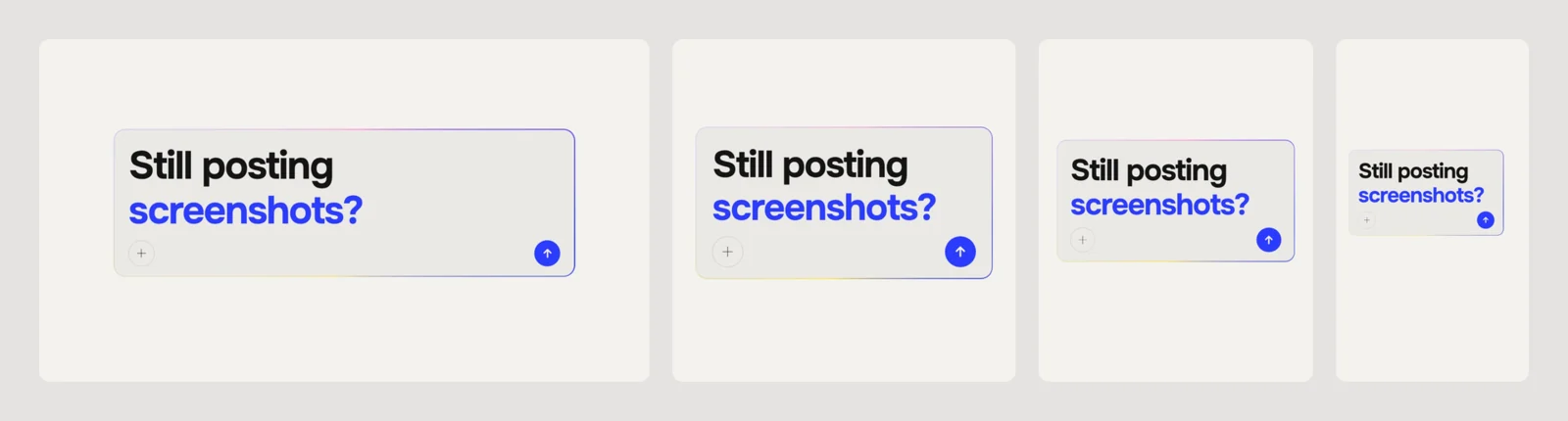
The format is not part of the storyboard: the same storyboard gives a 16:9, 1:1, 4:5 and 9:16 video, and one credit exports all four. That requires every text to fit its box whatever the format and whatever the brand’s font, sometimes a very wide one. Headlines are measured once the fonts have loaded, then broken into balanced lines; one-line texts (buttons, pills) shrink rather than overflow.
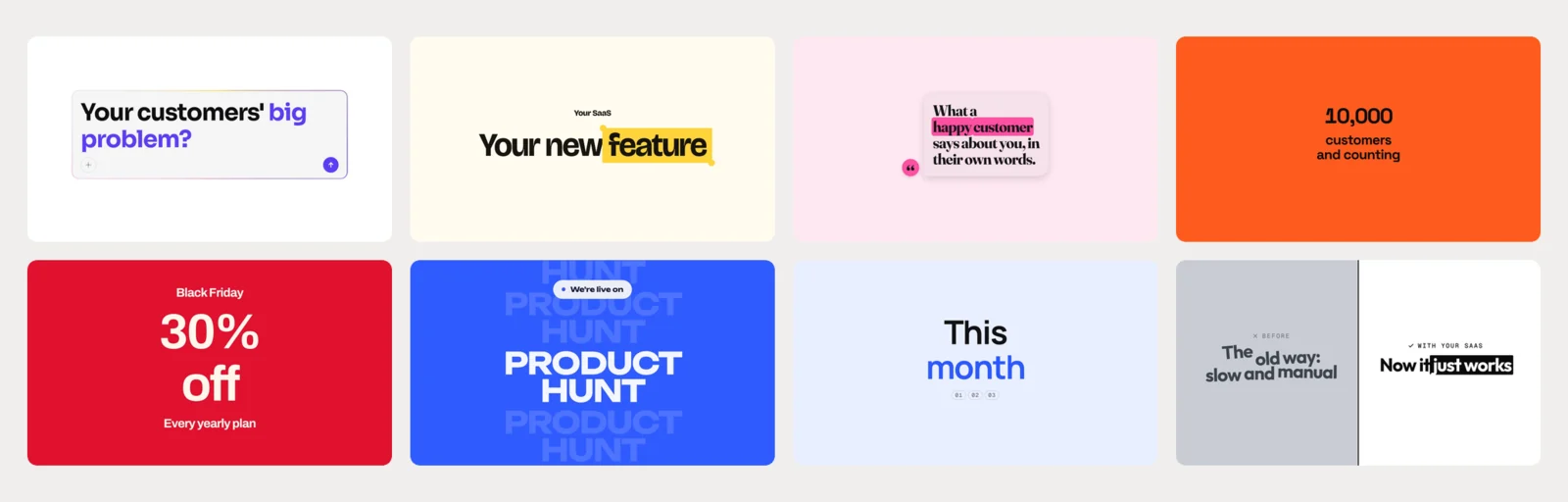
Teaso offers eight templates, one per type of video: launch, new feature, testimonial, milestone, offer, launch day, monthly changelog, before and after.
Teaso’s own launch video was made by Teaso, from teaso.app:
Rendering a video across 200 functions
Rendering runs on Remotion Lambda, in AWS’s Paris region. The video is split across up to 200 functions of 3 GB, each rendering its chunk in parallel, then the assembled MP4 is written straight into the app’s storage.
Splitting has its limits. On 17 October, six-frame chunks produced an MP4 whose frames all piled up in the first tenth of a second: ffmpeg joins chunks that are too short badly. Each chunk now lasts at least 0.2 s.
The compositions are deployed to Lambda on every commit, under a name taken from that commit. The worker always renders with the ones from its own code: a render started just before a deployment finishes on the old version, and a rollback brings back the old template too.
Opening unknown sites safely
Teaso loads any address it is given in a browser, which makes it an obvious target. The browser runs in its own container, on an internal Docker network with no route to the Internet, the database or the host. Its only way out is a proxy in the worker, which filters the allowed addresses. Chromium’s sandbox stays on, under an unprivileged user.
Files sent by users are treated as untrusted data: the type is read from the first bytes, the dimensions from the header before any decoding (20 MB and 50 megapixels at most), then each image is re-encoded to WebP without its metadata.
A product, not a prototype
The rest is what separates a demo from a service strangers pay for:
| Need | Choice |
|---|---|
| Hosting | A VPS in France, Docker Compose, Caddy; nightly database backup to separate storage |
| Deployment | CI on every pull request, production on every merge, rollback without rebuilding |
| Sign-in | A six-digit code by email, no password and no magic link |
| Payments | Stripe Checkout, one-off or subscription, invoices compliant with the VAT exemption |
| Amazon SES, paid per email rather than by subscription | |
| Analytics | Self-hosted Umami, cookie-free, so no consent banner |
| Errors | Sentry, EU region, unexpected errors only |
Vercel was ruled out: its free plan forbids commercial use, and Playwright does not run there.
The magic link was ruled out for a usage reason: opened from the Gmail app, it opens in another browser, where the user would lose the video they had just made without an account.
The first two weeks, from the first commit on 7 October 2026 to the paid version going live, add up to 107 merged pull requests and around a hundred test files.
What I take away
Working alone on a product is mostly about deciding what to cut. Music and sound effects left the scope: the video plays muted, and neither effects alone nor synthesised music were convincing. The free first video every account got was removed on 19 October: its end screen spoiled it, and it gave away the launch video, often the only one a founder needs.
On the technical side, Teaso brought me back to a computer vision reflex: trust what the image shows rather than what the source declares.